Automatic Context Management
Never lose your collaboration flow. BB's automatic context management intelligently handles token limits, allowing collaborations to continue indefinitely while preserving what matters most.
Why Context Management Matters
Every LLM has a context window—a limit on how much information it can process at once. When collaborations get long, you typically hit this limit and must start over, losing valuable context. BB's automatic context management solves this problem.
❌ Without Context Management
- Collaborations abruptly end when token limits are reached
- Must manually start new collaborations and re-establish context
- Lose important information from earlier in the collaboration
- Interrupt workflow to manage technical details
- Risk losing track of project progress and decisions
✅ With BB Context Management
- Collaborations continue seamlessly without interruption
- Important information is automatically preserved
- Older, less relevant context is gracefully archived
- Stay focused on your objectives, not token limits
- Build on previous work across extended sessions
How Context Management Works
BB monitors your collaboration's token usage in real-time. When approaching the context limit, it automatically takes action to preserve important information while making room for the collaboration to continue.
The Context Management Process
- Monitoring: BB continuously tracks token usage as you converse
- Trigger Detection: When usage reaches your configured threshold (default: 160k tokens or 80% of a 200k context window), context management activates
- Intelligent Preservation: BB identifies and saves critical information:
- Important memories and insights
- Key decisions and rationale
- Active project context
- Recent collaboration flow
- Graceful Archiving: Older, less relevant content is archived to free up context space
- Seamless Continuation: The collaboration continues naturally with preserved context
💡 Pro Tip: Context management works hand-in-hand with BB's memory system. Important insights are saved to memory before archiving, ensuring nothing critical is lost.
Model-Specific Features
BB provides two levels of context management depending on which LLM you're using:
🌟 Advanced Context Management (Claude Models)
When using Claude models, BB provides refined, highly-intelligent context management with user-configurable trigger levels.
Features:
- Sophisticated analysis of what information to preserve
- Intelligent memory extraction before archiving
- User-configurable trigger thresholds
- Smooth transitions with minimal context loss
- Optimal performance for extended collaborations
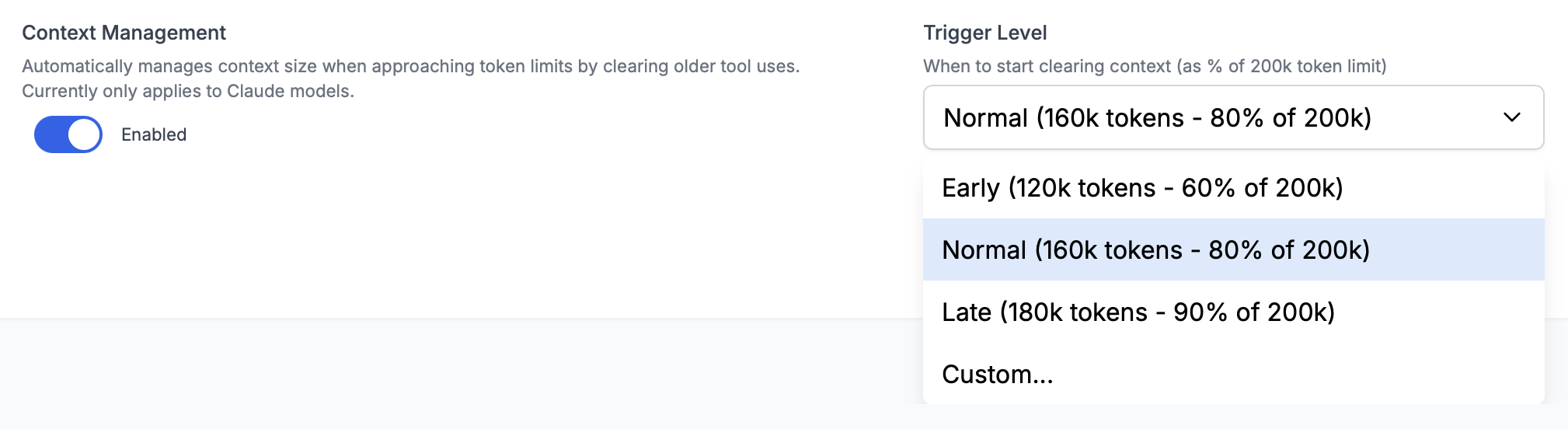
Trigger Level Options:
Early (120k tokens / 60%): Triggers sooner, giving more headroom for complex operations
Normal (160k tokens / 80%): Default setting, balances context preservation with efficient usage
Late (180k tokens / 90%): Maximizes context before management, suitable for shorter collaborations
Custom: Set any threshold between 10k tokens and your model's context window size
🔧 Standard Context Management (Other Models)
For non-Claude models, BB uses a built-in collaboration summary tool that provides automatic context management.
Features:
- Automatic triggering based on context window size
- Collaboration summarization before truncation
- Preservation of key information
- Works with any LLM provider
Note: The standard context management tool is less refined than the Claude-specific version and currently doesn't offer user-configurable trigger thresholds. We're working on bringing advanced features to all models.
Configuring Context Management
Context management settings follow BB's cascading configuration system, allowing you to set defaults globally and override them per project or collaboration.
Workspace Settings
Configure your default context management behavior in Workspace Settings. These defaults apply to all new projects and collaborations.
Available Options:
- Enable or disable context management entirely
- Choose trigger level (Early/Normal/Late/Custom)
- Set custom threshold values (Claude models only)
Project Settings
Override global defaults for specific projects in Project Settings. Useful when different projects have different context needs.
Example: Use "Late" trigger for short-session projects, "Early" for complex, long-running work.
Collaboration Settings
Adjust context management for individual collaborations in Collaboration Options. Perfect for specific use cases or experiments.
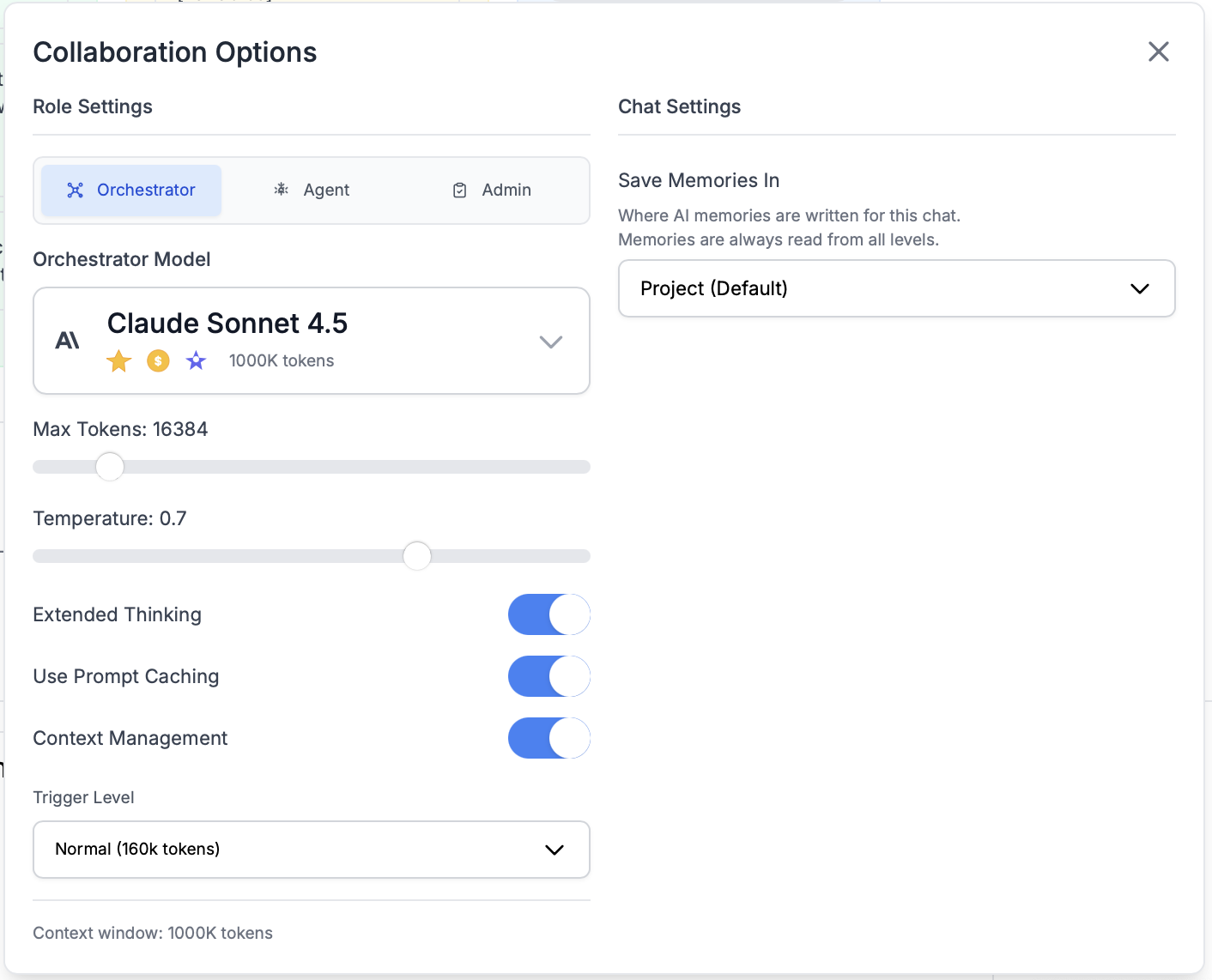
Example: Disable context management for a single quick question, or use "Early" trigger for a complex multi-hour session.
Monitoring Context Usage
BB provides real-time visibility into your context usage so you always know where you stand:
Progress Indicator
The context progress bar in your input area shows:
- Current token usage vs. total available
- Percentage of context window consumed
- Color-coded warnings as you approach limits
- Tick marks for tiered pricing models
Model Information
Click "Model Info" to see detailed context statistics:
- Exact token counts
- Context window size
- Prompt caching benefits
- Current configuration
📊 Learn more: See the Chat Interface documentation for details on monitoring and optimizing token usage.
Best Practices
✅ Optimizing Context Management
- Trust the automation: Let BB handle context management automatically—it's designed to work seamlessly in the background
- Use appropriate trigger levels: "Normal" works for most cases; use "Early" for complex projects, "Late" for simple tasks
- Leverage memory system: Important information is saved to memory before archiving, so trust the process
- Start fresh for new topics: While collaborations can continue indefinitely, starting new collaborations for distinct objectives keeps context focused
- Monitor context usage: Keep an eye on the progress bar to understand your collaboration patterns
📚 When to Adjust Settings
Use "Early" trigger when:
- Working on complex, multi-hour sessions
- Handling large file operations that consume context quickly
- Want more headroom for safety
Use "Late" trigger when:
- Having shorter collaborations
- Want to maximize context before management
- Cost optimization is a priority
Disable context management when:
- Asking single, simple questions
- Testing specific scenarios where you want to hit limits
- Deliberately working within tight context constraints
⚠️ Common Misconceptions
- "Context management deletes my work": No! Important information is saved to memory before archiving. You won't lose critical insights.
- "I need to manually manage context": BB handles this automatically. Trust the system unless you have a specific reason to intervene.
- "Earlier = better": Not necessarily. The "Normal" trigger level is optimized for most use cases. Triggering too early can be inefficient.
- "This costs more tokens": Context management actually helps manage costs by preventing wasted context and enabling prompt caching.
Limitations & Considerations
Model-Specific Features
Advanced context management with configurable triggers is currently only available for Claude models. Other models use the standard collaboration summary tool.
Information Archiving
While important information is preserved in memory, very detailed or verbose context from early in the collaboration will be archived. This is by design to maintain focus on current work.
Performance Impact
Context management operations take a few moments to process. You'll see a brief indication when it's happening, but the collaboration continues smoothly.
Custom Thresholds
When using custom trigger thresholds, setting them too low (triggering too early) can lead to inefficient context usage. Setting them too high (triggering too late) may not leave enough room for context management to work effectively.
Next Steps
Last updated: December 7, 2025