Orchestrator & Agents
In Beyond Better, the orchestrator plans the work and agents do parts of it in the background. Their reports come back to the orchestrator, which brings everything together for you.
The Idea in One Minute
- The orchestrator is the assistant you talk to. It understands your objective, decides how to split the work, and answers you.
- Agents each take one task, such as "summarise these five reports" or "check the pricing pages of these competitors". They work in the background, in their own conversation, and send a report when they finish.
- Personas decide how each of them works: the LLM, instructions, tools and limits. You don't steer agents one by one; you shape them through personas.
Why it helps: independent parts of a job run at the same time, each agent starts with a clean, focused context instead of the whole conversation, and the orchestrator's own conversation stays short enough to keep the big picture in view.
How It Works
- Plan: the orchestrator works out which parts of your request can be handed off.
- Start agents: it writes a task for each agent, with the background and instructions the agent needs, and picks a persona for each one. An agent can't see your conversation, only its task.
- Carry on: the orchestrator doesn't wait. It can keep working, answer you, or finish its turn while the agents work.
- Reports arrive: as each agent finishes, its report appears in the conversation. If the orchestrator had finished its turn, it picks the report up and continues on its own.
- Bring it together: the orchestrator combines the reports into the answer you asked for.
How many at once: up to 5 agents run at the same time in a conversation. Any more wait in a queue and start as others finish. See How many agents run at once to lower or raise this.
Agents starting agents: if a persona allows it, an agent can split its own task and start agents of its own, up to 3 levels deep. By default, agents can't.
Always available: starting and managing agents doesn't depend on which tool sets you select, so turning tool sets off doesn't stop the orchestrator from delegating. Use a persona's Delegation depth to stop it.
Asking for Agents
The orchestrator decides for itself when agents are worth it. Simple requests, and work that needs a lot of back-and-forth with you, are usually done directly. You can also ask:
"Use agents to review each of these three research papers, then compare their methods."
"Start a Researcher agent for the background reading while we work on the outline."
What You See While Agents Work
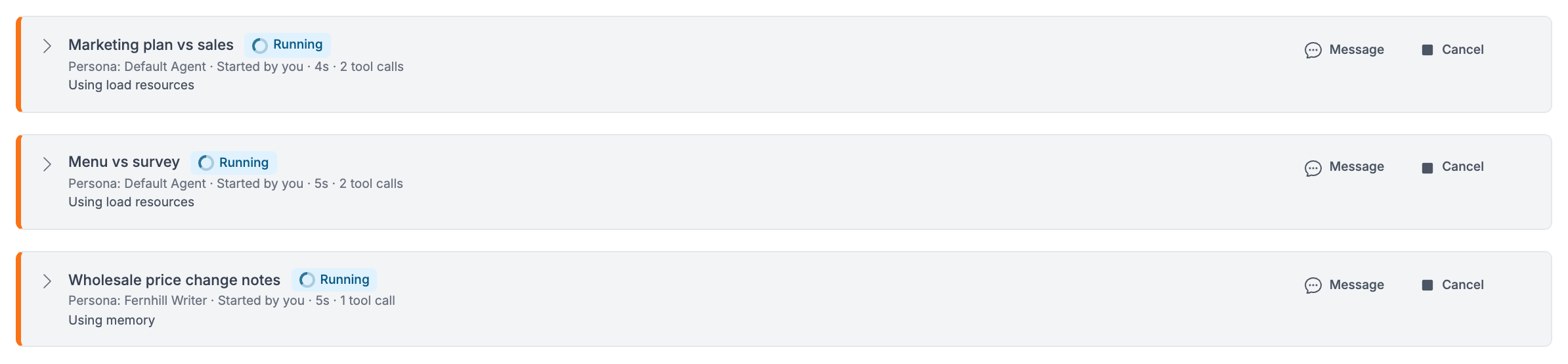
Agents started together appear in the conversation as an agent group. For each agent it shows the task, the persona, a status, the time it has been running, and its latest progress. Agents started by an agent appear as a group nested inside it.
| Status | What it means |
|---|---|
| Queued | Waiting for a free place among the agents that can run at once. |
| Running | Working on its task. |
| Waiting | Paused for a person: a question, an approval, or an MCP server sign-in. A parent agent shows "Waiting for its agents". |
| Stopping | Finishing its current step after a cancel. |
| Completed | Finished; its report is in the conversation. |
| Needs more work | Finished, but reported that the task needs more work. |
| Failed | Couldn't finish, for example because a data source its task uses was removed, or BB restarted. |
| Cancelled | Stopped by a person or by the orchestrator. |
| Ended | No longer running, but its outcome isn't known in this view yet. The agent's report says how it finished. |
The status bar above the message box says in plain words what is happening, such as "Editing report-draft.md" or "Starting 3 agents", with a line for each running agent.

Steering Running Agents
- Message: send an agent extra instructions. It reads your message after its current step. Everyone in the conversation sees the message, as yours.
- Cancel: stop one agent. The answer and other agents carry on. Cancelling an agent also cancels any agents it started. If someone else started it, BB asks you to confirm first.
- Stop: the Stop button's menu can also cancel running agents, or halt everything. See Managing Collaborations.
- Answer questions: agents can ask a question and wait for an answer. Anyone who can write to the conversation can answer it. See Questions & Approvals.
Message and Cancel appear on queued, running and waiting agents, for anyone who can write to the conversation. The orchestrator has the same abilities: it can message, cancel and wait for its agents, and look back through an agent's work.
If BB restarts: agents that were running or queued stop and show as Failed ("It was stopped by a server restart."). Their reports still reach the conversation, so the orchestrator knows what was done and can start them again.
Whose Access Agents Use
Normally an agent works with the access of the person whose message started it. In a shared team workspace, your team can set up agent accounts so agents run with an account of their own. The agent group then shows a label such as "As Research agent, started by Sam".
Time and Cost
- Agents finish large jobs sooner because they work at the same time, but each one also costs credits: it starts with its own instructions and does its own reading.
- The agent persona's model matters most for cost, because many agents may run. A faster, cheaper LLM is often enough for reading and summarising.
- Use Agents at once and Delegation depth in a persona's limits to keep spending bounded.
Example Uses
Literature review
- Agent: urban planning studies
- Agent: agricultural adaptation studies
- Agent: economic impact assessments
- Orchestrator: one combined review
Multi-channel content
- Agent: blog plan
- Agent: social media calendar
- Agent: newsletter outline
- Orchestrator: consistent messaging and timing
Customer analysis
- Agent: purchase history
- Agent: support conversations
- Agent: website behaviour
- Orchestrator: customer profiles
Software project
- Agent: API design
- Agent: data transformation
- Agent: error handling
- Orchestrator: make the parts fit together
Getting Good Results
- Say what the finished result should look like. The orchestrator passes that on to its agents.
- Give agent personas clear names and descriptions, so the orchestrator picks the right one for each task.
- Keep agents' tool sets as narrow as their work allows, and use "Ask a person to approve each one" where you want a say.
- Older guidelines that mention
delegate_tasksstill work, but the tool is now calledstart_agents.
Next Steps
Personas
Set the model, instructions, tools and limits each role and agent works with.
Chat Interface
Agent groups, the status bar and other parts of the conversation view.
Agent Accounts
Run agents with an account of their own in a shared workspace.
How BB Works
The bigger picture of how BB plans and carries out your work.
Last updated: November 16, 2026