Agent Accounts
An agent account is an account that Beyond Better's agents can run as, with a role of its own, instead of running with the access of the person who started them.
Why Use Agent Accounts
By default, an agent can do whatever the person whose message started it can do. That's simple, but it means an agent's reach depends on who happened to ask. Agent accounts change whose permissions an agent uses:
- Give agents a narrower role than your team members have, for example read-only access for research agents.
- Make agents behave the same whoever starts them.
- See which agent work used which account, and who started it, in the conversation and in usage reports.
Where Agent Accounts Apply
- Shared team workspaces only. Agent accounts aren't available in personal workspaces, in personal organizations, or in Local-Only mode, and agents there always run as the person who starts them. A personal workspace has only you, so there is nobody else for agents to act for. In a personal workspace the Agent Accounts tab (in workspace settings and in the project editor) says so and suggests switching to a shared team's workspace.
- Not API tokens. API tokens (Settings > Workspace > API Tokens) let other programs connect to BB. Agent accounts are only for BB's own agents.
Creating and Managing Accounts
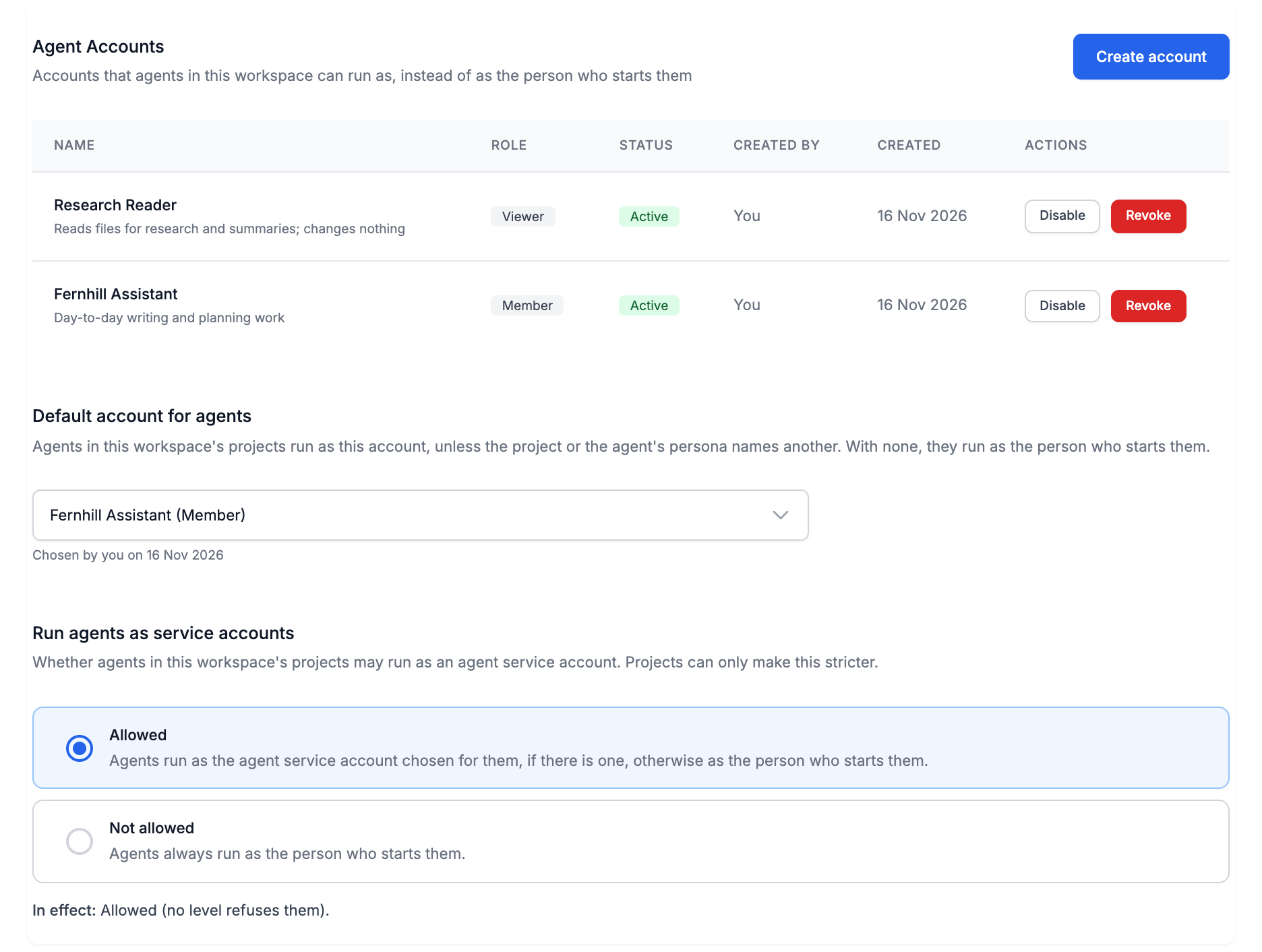
Accounts live in Settings > Workspace > Agent Accounts. Only workspace admins can create accounts.
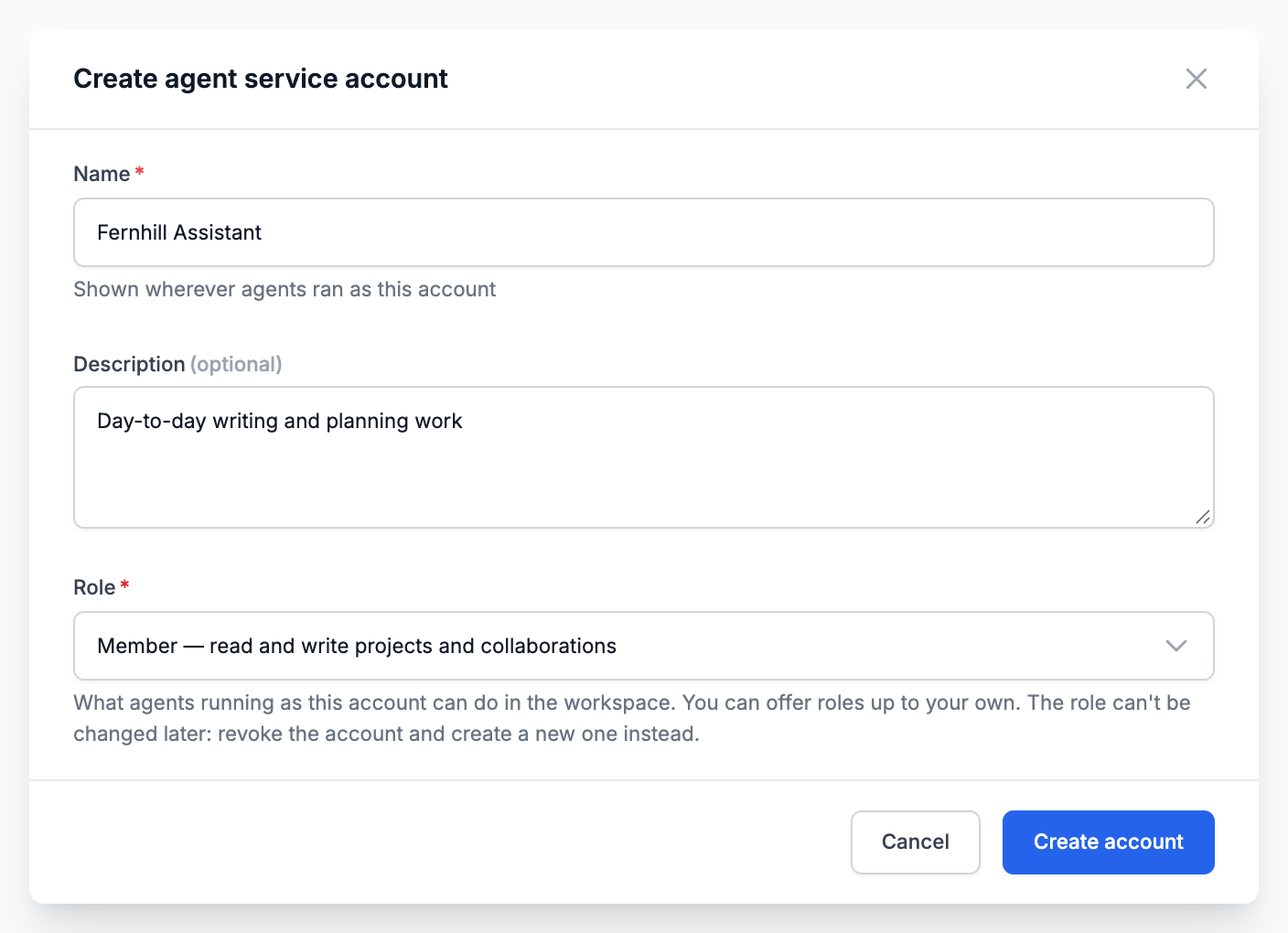
- Click Create account.
- Enter a Name (for example "Research agent") and an optional Description.
- Choose a Role. You can offer roles up to your own.
| Role | Agents running as the account can |
|---|---|
| Viewer | Read projects and data sources, nothing more. |
| Member | Read and write projects and collaborations (the default). |
| Project Admin | Create and administer projects. |
| Workspace Admin | Administer the workspace and its data sources. |
| Admin | Everything except deleting the organization. |
An account's role never changes. To give agents a different role, revoke the account and create a new one.
Team leads and owners, and organization owners and admins, can:
- Disable: agents using the account now are stopped from using it, and no new agent runs can use it until you Enable it again.
- Revoke: permanent. Agents can never run as it again, and projects and personas bound to it go back to running agents as the person who starts them.
Choosing Which Account Agents Use
Creating an account doesn't put it to work. You bind it in up to three places, and a fourth setting decides whether a persona's account counts in a project. Only team leads and owners, and organization owners and admins, see these settings, and they are offered only accounts whose role is no higher than their own.
1. Workspace default
Settings > Workspace > Agent Accounts, Default account for agents. Agents in all the workspace's projects run as this account unless a project or persona names another.
2. Project account
The project's Agent Accounts tab (Settings > Projects, edit the project), Project account. Replaces the workspace default in that project.
3. Persona
The Agent service account field in the persona editor. Click Edit on a persona card, in Settings > Workspace > Project Defaults > Personas or in a project's Personas tab. Agents started with that persona run as the account.
Easy to miss: there is no bind button on persona cards, and nothing about personas on the Agent Accounts tabs. The field appears only:
- for team leads and owners, and organization owners and admins;
- on your own workspace or project personas. Built-in personas can't be bound: use Copy to customise first;
- on personas that are already saved. Save a new persona first, then edit it again.
The binding is saved as soon as you choose an account, not with the page. The persona card then says "Its agents run as …".
4. Project allow-list
The project's Agent Accounts tab, Also allowed for personas. In a project, a persona's account is used only if it is the project's account (or the workspace default when the project has none) or is on this list. Otherwise the binding is kept but ignored in that project, and the persona card says the project doesn't allow it.
Which account a run uses
- The persona's account, if the project allows it
- otherwise, the project's account
- otherwise, the workspace default
- otherwise, the person who started it
There is no organization-wide default account.
Allowing or Refusing Agent Accounts
The Run agents as service accounts setting, Allowed or Not allowed, decides whether accounts may be used at all. With Not allowed, agents always run as the person who starts them.
| Level | Where | Who can change it |
|---|---|---|
| Organization | Settings > Organization > General | Organization owners and admins |
| Workspace | Settings > Workspace > Agent Accounts | Team leads and owners, organization owners and admins |
| Project | The project's Agent Accounts tab | Any team member can tighten it; only team leads and owners can loosen it |
- The strictest level wins. A workspace or project can only make the setting stricter. Each section shows what is In effect and which level set it.
- The default is Allowed, which changes nothing until an account is bound.
- No borrowing a higher role. You can run agents as an account only if your own role is at least the account's. Otherwise your agents run as you, and the orchestrator doesn't pick personas bound to that account for you.
Run My Agents as Me
When your agents would run as an account, a Run my agents as me switch appears in the message toolbar ("As me" on narrow screens). Turn it on when a task needs your own access, for example an MCP server you have signed in to.
- It applies to agents started for your messages, and to the agents those agents start.
- It is off by default, and it is kept for that conversation only while the Web App stays open. After a reload it is off again.
- Your agents also run as you when your role is below the account's, or when the setting above is Not allowed.

In the Conversation
- Agent groups and their reports carry a label such as As Research agent, started by Sam ("started by you" for your own).
- If such an agent needs a person's approval for a step outside its persona's scope, only the person who started it, or someone whose role is at least the account's, can approve it.
- A run ends early if the person who started it loses access to the project, if the setting is tightened to Not allowed, or if the account is disabled or revoked. The agent's report says why.
Agent Accounts and MCP Servers
Some MCP servers need each person to sign in with their own account. An agent account can't do that, so an agent running as one can use only servers that need no per-person sign-in. For the others it reports:
Not available to Research agent: this server only works with each person's own sign-in, which service accounts can't use.
If a task needs such a server, turn on Run my agents as me.
Bound Personas Are Protected
Once a persona is bound to an account, only team leads and owners, and organization owners and admins, whose role is at least the account's can change its guidelines, tool sets, tool settings and limits. That stops someone with a lower role from changing what an account with more access does. Its name, description and model can still be changed by anyone who could edit it before. See Personas.
Usage by Account
Organization owners and admins can see who spent credits in Settings > Organization > Usage, in the Usage by Account card. Switch between By account and By who started it: agent work done as an agent account is listed with the person who started it.
Next Steps
Last updated: November 16, 2026