Using AWS Bedrock
Beyond Better can send requests for Claude models to AWS Bedrock using your organization's own AWS account. This page explains why you might want that, how to turn it on, and what your AWS account needs to allow.
Why Use AWS Bedrock?
- Your AWS account: requests go through your organization's AWS account, alongside the rest of your AWS services.
- Billed by AWS: AWS bills that account for the requests. They aren't paid for with BB credits.
- Same BB experience: Bedrock models appear in the model picker like any other, so you can choose them for personas and conversations as usual.
Turning On AWS Bedrock
AI providers are set for the whole organization, so only organization owners and admins can change them. You'll need AWS credentials from whoever manages your AWS account (see the section for them below).
- Open Settings, choose Organization, then the Connections tab
- Under AI providers, open AWS Bedrock and turn on Enabled
- Choose the AWS Region your AWS account uses for Bedrock
- Enter the Access Key ID and Secret Access Key. If you were given temporary credentials, also enter the Session Token
- Click Save
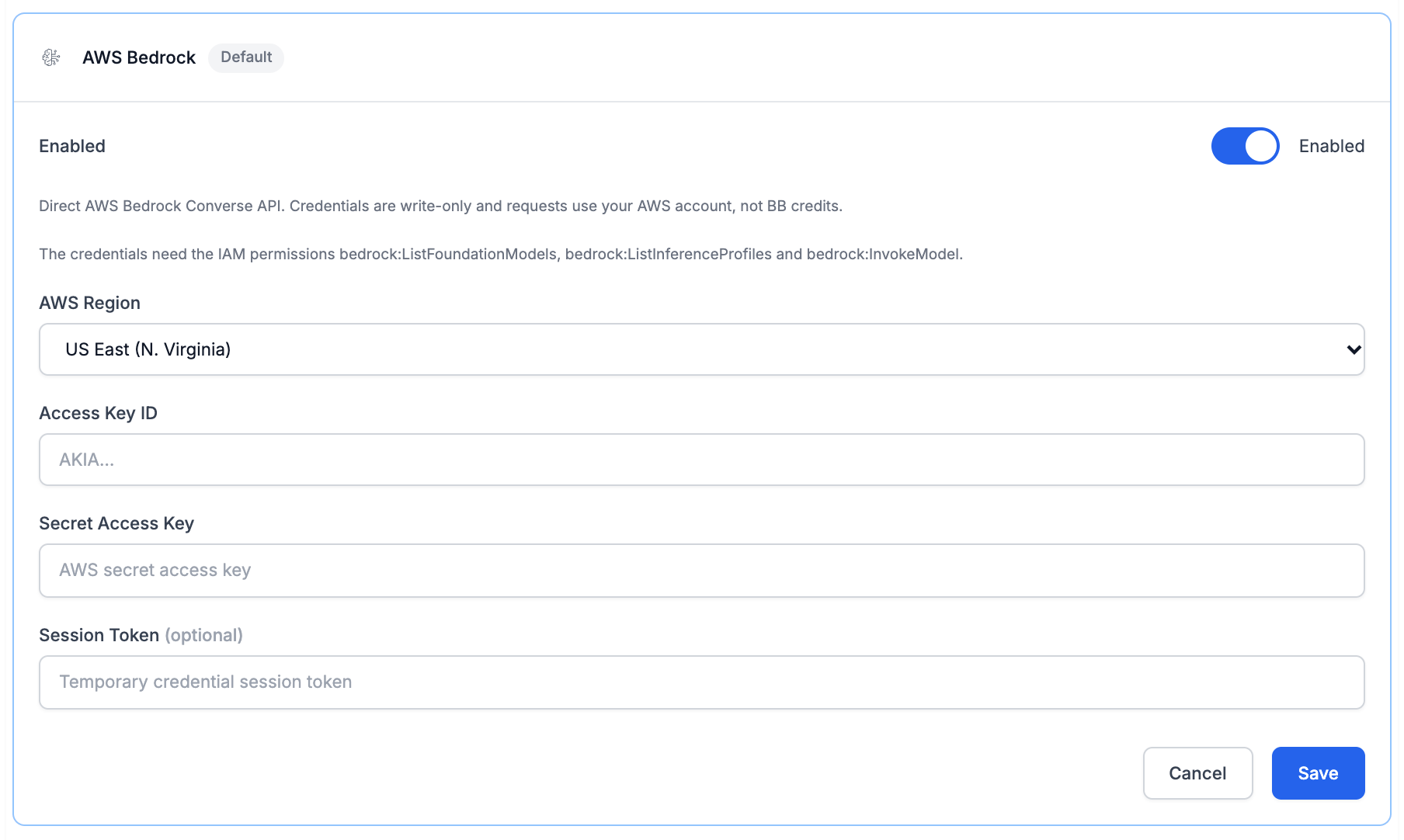
Saved keys stay hidden. Credentials are stored encrypted and only ever shown masked, such as "•••• configured". They can't be read back: to change one, type a new value. Use Remove key to clear a saved key.
Choosing Bedrock Models
Once Bedrock is set up, BB lists the Claude models your AWS account can use in the chosen region.
Cross-Region Profiles
AWS also offers cross-region inference profiles, which send each request to one of several AWS regions. When the model picker shows model versions, these appear as extra rows such as "<Model> (us cross-region profile)".
If BB can't list your account's profiles, the model picker says:
"Cross-region inference profiles could not be listed for this AWS account, so only the base Bedrock models are shown. To choose a profile, allow bedrock:ListInferenceProfiles for the AWS credentials in the AWS Bedrock provider settings."
Bedrock still works; ask whoever manages your AWS account to add that permission if you want the profiles.
For Whoever Manages Your AWS Account
This section is for the person who creates the AWS credentials. It lists the IAM permissions BB needs and what happens without each one.
IAM Permissions
| IAM action | What BB uses it for | Without it |
|---|---|---|
bedrock:ListFoundationModels | Finding which Claude models your account can use in the chosen region, so BB can offer them | BB can't list any Bedrock models, so none can be chosen |
bedrock:ListInferenceProfiles | Finding the cross-region inference profiles (such as us. or global. model IDs) you can choose instead | Bedrock still works, but only the regional models are offered, not cross-region profiles |
bedrock:InvokeModel | Sending messages to the model (BB uses the Bedrock Converse API, which needs this permission) | Every message to a Bedrock model fails |
The two list actions don't apply to a particular model, so they are granted on all resources ("Resource": "*"). bedrock:InvokeModel can be limited to the models you want BB to use. BB doesn't currently stream Bedrock responses, so bedrock:InvokeModelWithResponseStream isn't needed.
Example Policy
This policy allows the Claude models BB supports, both directly in a region and through cross-region inference profiles. Replace 123456789012 with your AWS account ID.
{
  "Version": "2012-10-17",
  "Statement": [
    {
      "Sid": "BBListBedrockModels",
      "Effect": "Allow",
      "Action": [
        "bedrock:ListFoundationModels",
        "bedrock:ListInferenceProfiles"
      ],
      "Resource": "*"
    },
    {
      "Sid": "BBInvokeClaudeModels",
      "Effect": "Allow",
      "Action": "bedrock:InvokeModel",
      "Resource": [
        "arn:aws:bedrock:*::foundation-model/anthropic.claude-*",
        "arn:aws:bedrock:::foundation-model/anthropic.claude-*",
        "arn:aws:bedrock:*:123456789012:inference-profile/*.anthropic.claude-*"
      ]
    }
  ]
}
Notes on the InvokeModel Resources
- Regional models only. If you only use model IDs without a prefix (such as
anthropic.claude-sonnet-4-5-...), the first resource line is enough, and you can replace the*region with your chosen region. - Cross-region inference profiles. A profile (such as
us.anthropic.claude-...orglobal.anthropic.claude-...) sends each request to one of several AWS regions. The credentials need permission on the profile itself and on the model in every region the profile can send requests to, which is why the example uses*for the region of both.global.profiles also need the model ARN with no region at all (arn:aws:bedrock:::foundation-model/...), which is the second resource line. - Narrower access. To allow only certain models, replace
anthropic.claude-*with their model IDs.
AWS Organization Policies
If your AWS organization restricts which regions can be used (for example with a service control policy), cross-region profiles only work when every region the profile uses is allowed. AWS checks global. profiles with aws:RequestedRegion set to unspecified, so a policy that allows only certain regions must also allow unspecified for them to work.
Model Access in AWS
Permissions alone aren't always enough: AWS may also need the model to be available to your account. The first time your AWS account uses an Anthropic model, AWS can ask for a short use-case form, and some accounts need an admin to enable the model first. Do this in the Amazon Bedrock section of the AWS console, in the same region you choose in BB. If a model you expect isn't offered in BB, check that it is available to your account in that region.
Next Steps
Last updated: November 13, 2026